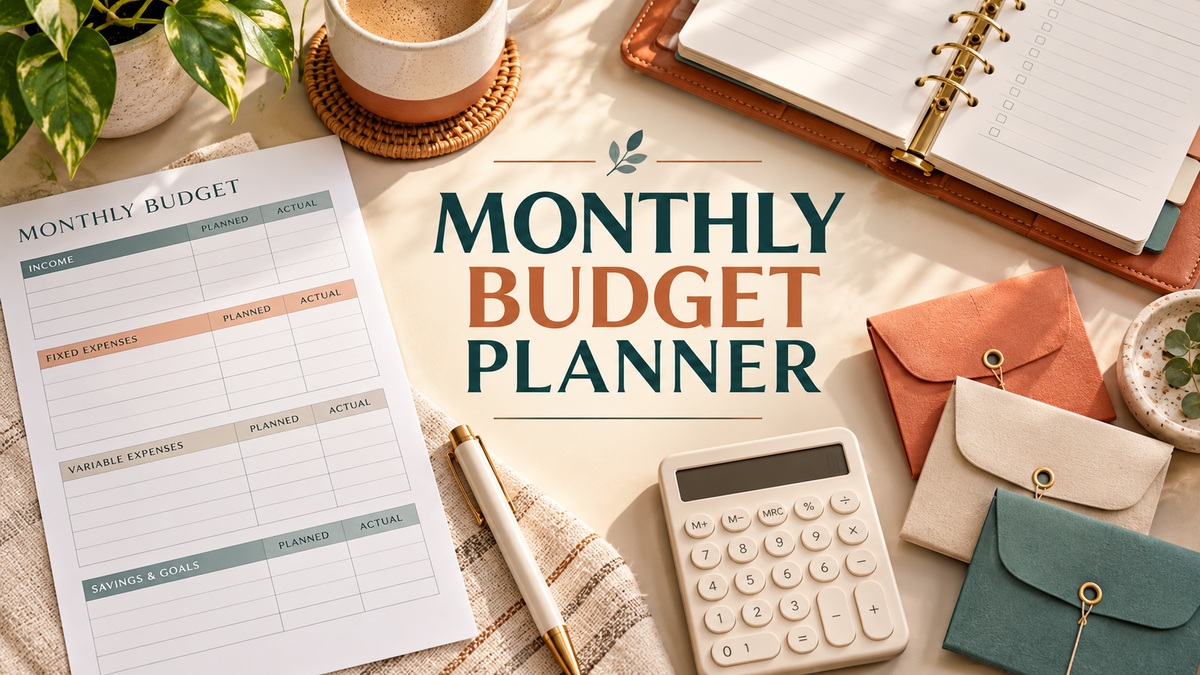
11 Monthly Budget Planners for Spending, Bills and Savings Goals
A monthly budget planner gives income, bills, spending and savings a shared time frame. The useful choice is the working format: a Google Sheets workbook, an Excel-compatible toolkit, a printable PDF or an editable Canva layout. These eleven resources cover those approaches, with different amounts of setup and ongoing entry.
Choose the sections you expect to maintain rather than the largest dashboard. A focused expense record and a full monthly budget solve different tasks; compare the supplied files and the planned-versus-actual workflow before choosing. Automated calculations depend on the workbook and its formulas, while printable pages and Canva layouts need their own recording method.
A monthly budget planner helps you decide what to allocate before the month begins; an expense tracker records what actually happened. Choose a format that makes the comparison easy to maintain. Spreadsheet templates and Canva printables are both represented below, but they do not offer the same calculations or editing workflow.
In this guide
Choose the right monthly budget planner format
| Planning need | Start with | What to check |
|---|---|---|
| Google Sheets calculations | Monthly budget spreadsheet | Account access, formulas and input cells |
| Excel or Sheets source files | Multi-format finance tools | The exact files included in the archive |
| Simple spending record | Canva expenses tracker | Manual entries rather than automatic imports |
| Monthly visual summary | Google Sheets dashboard | Categories and transaction-entry process |
1. Monthly Budget Planner Google Sheet
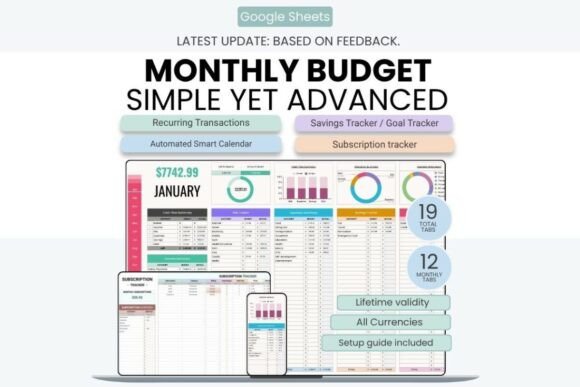
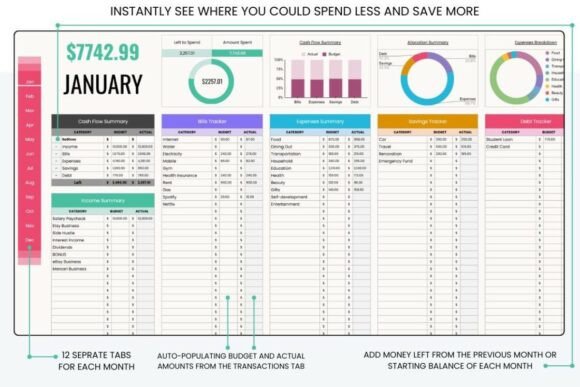
If you want your budget to do some of the mathematical work for you, this is one of the strongest options in the collection.
The Google Sheets template contains 19 organized tabs, monthly dashboards, income and expense tracking, budget-versus-actual comparisons, a transaction log, sinking funds, savings goals, subscriptions, recurring transactions, and an automated calendar for scheduled transactions. It also provides annual financial summaries and automatic calculations and reports.
I especially like the distinction between simply recording what you spent and actually comparing planned spending with reality. That turns a monthly budget into something you can review and adjust instead of a document you fill in once and forget.
It is designed specifically for Google Sheets and can be accessed from computers, tablets, and smartphones, with data synchronized across devices.
For someone who wants a serious digital budgeting system without manually building formulas from scratch, I’d put this near the top of the list.
2. Monthly Budget Planner Dark Version
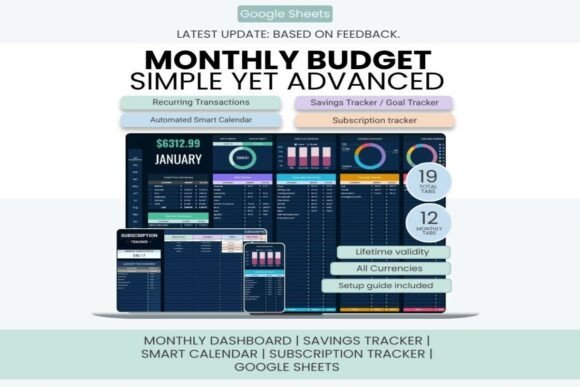
Budgeting can be a lot more pleasant when the interface doesn’t look like a boring accounting document. This dark-themed option is aimed at people who prefer a modern, distraction-free financial workspace.
The current listing specifies a 19-tab Google Sheets planner with monthly dashboards, income and expense records, budget-versus-actual comparisons, subscriptions and sinking funds. It explicitly says Google Sheets only and not compatible with Microsoft Excel.
What makes this one interesting is the visual approach. The darker interface isn’t just decorative; it gives the spreadsheet a completely different feel from traditional bright financial templates.
A free Google account and an internet connection are required. Recurring transactions and an automated calendar are described in the listing; those spreadsheet features should not be confused with a verified live bank-account connection. Choose this for its Google Sheets workflow and dark presentation.
I’d choose this one for someone who wants spreadsheet functionality with a more polished, modern aesthetic.
3. Monthly Budget Planner Finance Sheet
Not everyone needs an elaborate financial dashboard. Sometimes the most useful monthly budget planner is simply the one that makes income and spending easier to understand.
This option is worth considering if you prefer a more traditional finance-sheet approach. Its focus is the monthly budgeting process rather than turning your finances into a massive all-in-one management system.
That distinction is important when choosing a planner. If you already have a separate system for savings, investments, or debt, adding dozens of additional financial trackers may actually make your routine harder to maintain.
I’d place this type of planner in the focused budgeting category: useful for people who primarily want to plan their monthly money and keep spending organized without building an entire personal-finance database.
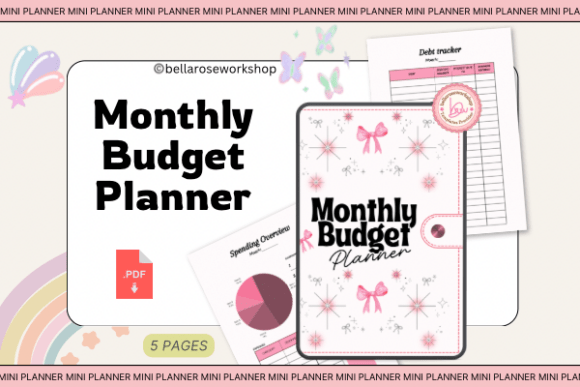
The seller identifies this resource as a PDF with a debt tracker, monthly budget and spending overview, intended for personal use. It is described for printing or tablet annotation rather than spreadsheet calculation. Check the actual page sizes and PDF fields before choosing it; the listing title’s word sheet does not establish an Excel or Google Sheets workbook.
4. Monthly Budget Planner
This is another option for anyone who wants the concept of a monthly budget kept front and center.
Rather than choosing a financial toolkit with numerous specialized trackers, a dedicated monthly budget planner can be easier to understand at a glance. You can make your financial planning revolve around the month itself — what comes in, what needs to go out, and how much room remains for your priorities.
I’d consider this kind of format particularly useful if you’re new to budgeting and don’t want to start with an intimidating financial system.
There’s a useful principle here that applies to almost every budget planner: complexity isn’t automatically a benefit. A simple system that you update consistently is much more valuable than an advanced one that you abandon after two weeks.
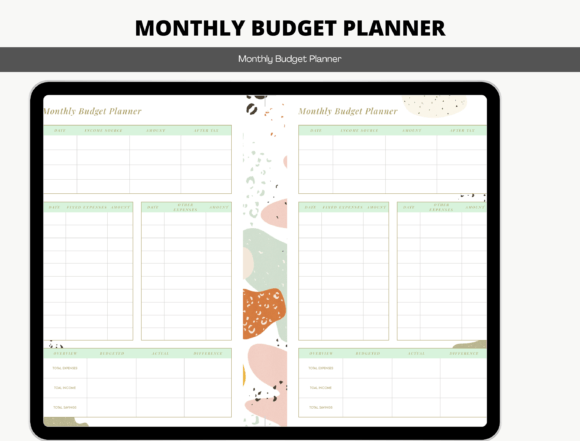
The description offers digital and printable use but does not identify a complete file manifest, page count or dimensions. Confirm the actual download format before choosing it for a particular app; no spreadsheet formulas or automatic imports are established by the generic description.
5. Financial Management Spreadsheets
If monthly budgeting is only one part of what you want to organize, a broader financial-management spreadsheet may make more sense.
This type of resource moves beyond the narrow question of “How much can I spend this month?” and toward the bigger picture of managing your finances systematically.
I’d look at this category if you want your monthly budget to connect with other financial information rather than existing on its own.
That can be particularly helpful once your financial situation becomes more complicated. Multiple income sources, savings targets, recurring expenses, and longer-term goals can make a basic monthly worksheet feel limiting.
The important thing is to avoid adding complexity just because you can. If your financial needs are still straightforward, one of the dedicated monthly planners above may be a better starting point.
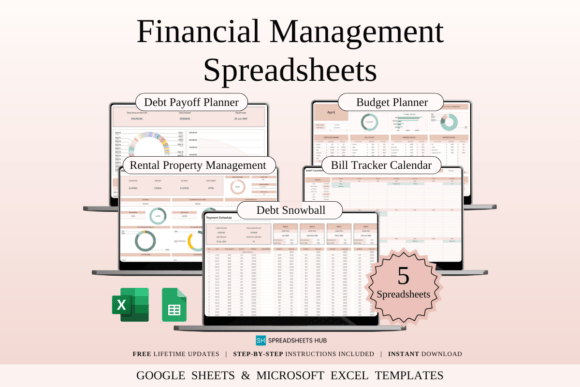
The creator lists five sample Google Sheets files, five blank Google Sheets files, five sample Excel files and five blank Excel files. These are twenty supplied versions across five tool types, not twenty unrelated budgeting systems. Instructions and links are included, and a desktop or laptop is recommended for fuller editing.
6. Financial Tools Excel & Google Sheets
This one takes a different approach by putting several financial tools into one package.
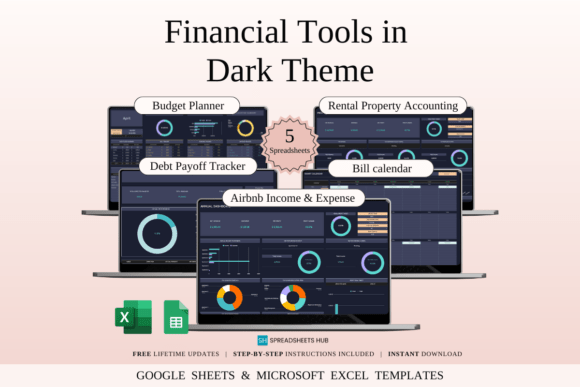
The bundle includes 20 spreadsheet templates, with sample and blank versions for both Google Sheets and Excel. Among the tools are a debt tracker, monthly bill calendar, Airbnb income and expense tracker, rental property finance tracker, and a dark-mode monthly budget planner.
That makes it particularly useful for people whose finances don’t fit neatly into a single personal-budget spreadsheet.
The compatibility with both Excel and Google Sheets is another advantage. You aren’t locked into one spreadsheet ecosystem, although the listing recommends a desktop or laptop for the best editing experience.
For me, this is less of a “monthly budget planner” and more of a financial toolkit that happens to include one. I’d choose it if you expect to use several financial trackers rather than only needing a monthly spending plan.
The twenty supplied files are five sample and five blank versions for each of Google Sheets and Excel. Choose the application and the relevant tool first; sample data and blank versions should not be counted as separate planning functions.
7. Monthly Finance Planner Template
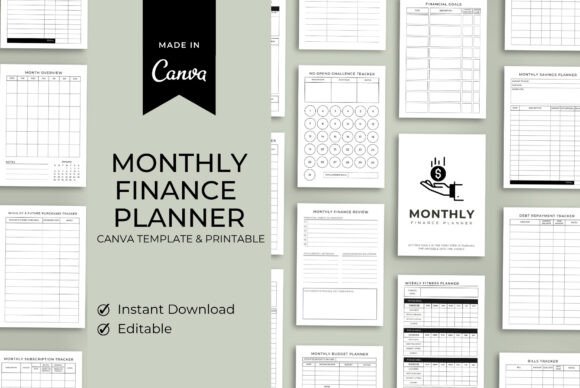
This Canva-based template takes a more visual and customizable approach to financial organization.
The listed sections include a budget planner, monthly review, finance summary, financial goals, savings, debt repayment, bills, wishlist and future purchases, subscriptions, and a monthly budget planner.
I like the fact that the structure isn’t limited to recording expenses. The inclusion of financial goals and monthly reviews encourages you to look backward and forward at the same time: what happened this month, and what do you want to accomplish next?
Because it’s designed in Canva, you can also customize the visual presentation, including colors, fonts, and layouts.
I’d choose this one if you prefer your budgeting tools to feel more like a personal finance journal than a conventional spreadsheet.
Access is supplied through a PDF link to the editable Canva design. The description mixes planner instructions with generic social-export wording, so check the actual page dimensions and export choices in the supplied template. Canva layout editing does not establish spreadsheet calculation.
8. Ultimate Personal Finance Toolkit
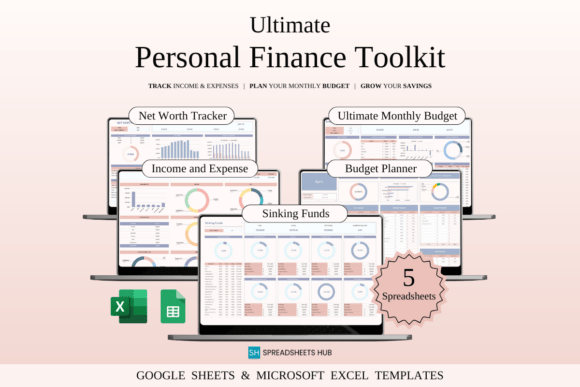
This is the option I’d investigate if your goal goes well beyond getting through the current month.
The toolkit contains five spreadsheets: an Ultimate Monthly Budget Spreadsheet, Net Worth Tracker, Sinking Funds Tracker, Budget Planner/Monthly Finance Tracker, and Income and Expense Tracker. The templates are designed for both Excel and Google Sheets.
That combination gives it a different purpose from a standalone monthly budget. You can use the monthly budget to manage immediate cash flow while also tracking things such as net worth and sinking funds over a longer period.
Built-in formulas, dashboards, charts, and sections for fixed and variable expenses, savings, and debt are also included.
For someone who is trying to build long-term financial habits, I think this is considerably more interesting than simply tracking expenses. You’re not only asking where your money went; you’re creating a broader picture of your financial progress.
9. Monthly Expenses Tracker Budget Planner
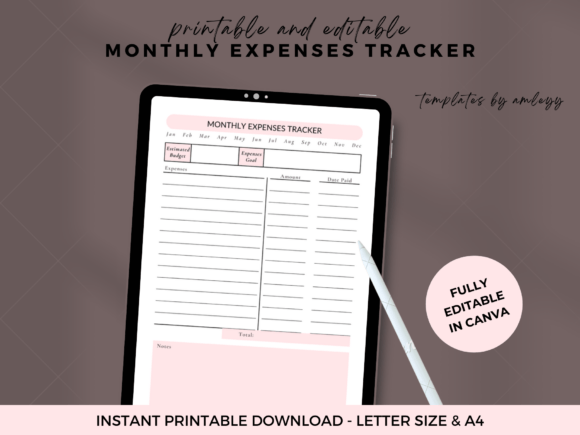
This one takes a deliberately focused approach to spending.
The Canva template is designed around recording the date, expense description, category, amount spent, and payment method. It has a clean, minimalist design and can be customized in Canva, including colors, fonts, and layout. It can also be used digitally or printed.
For me, this is an excellent example of why an expense tracker and a full budget planner aren’t necessarily the same thing.
If your biggest financial problem is simply not knowing where your money disappears, starting with a straightforward spending log can be more useful than jumping directly into a complex financial dashboard.
I’d recommend this style to beginners or anyone who wants maximum simplicity. You can focus on developing the habit of recording purchases first and add more sophisticated budgeting later.
10. Monthly Finance Tracker – Budget Plan
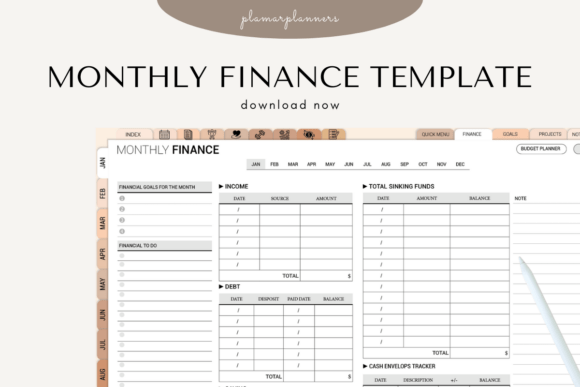
This option sits nicely between a basic expense log and a full financial-management toolkit.
It includes a monthly budget overview, income log, expense tracker, fixed-versus-variable cost breakdown, savings goals, monthly financial summary, debt payment log, and notes section. It’s supplied in A4 and US Letter PDF formats and has a digital version optimized for tablet use.
I particularly like the fixed vs. variable expense breakdown. It gives you a more useful view of your spending than simply adding up every purchase, because recurring obligations and flexible spending behave very differently in a monthly budget.
The planner is also positioned for individuals, families, students, and small businesses, so it isn’t tied to one specific type of financial situation.
If you want a balanced combination of income, spending, savings, and debt tracking without moving into a giant spreadsheet system, this is one of the more sensible choices.
11. Monthly Budget Google Sheets
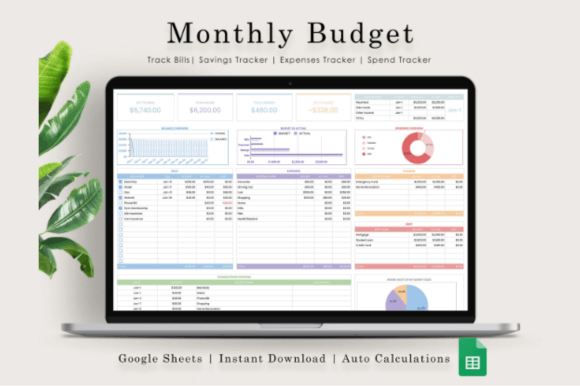
Google Sheets is particularly useful for budgeting because it combines accessibility with the ability to automate calculations and visualize information.
This template includes a monthly and annual budget spreadsheet, a dashboard with charts and graphs, and a transactions tracker organized by categories such as shopping, food, utilities, and groceries.
That dashboard element is what separates it from a simple list of expenses. Seeing financial information visually can make patterns much easier to notice — especially if you tend to understand numbers better when they’re represented through charts.
You’ll need a free Google account to use it, and the product is a digital download rather than a physical planner.
I’d choose this one if you want Google Sheets specifically and prefer seeing your monthly finances summarized visually instead of working exclusively from rows of transactions.
Which Monthly Budget Planner Is Right for You?
The easiest way to narrow these options down is to start with how you prefer to budget, rather than how many features each product has.
If you want a simple spending tracker, the Monthly Expenses Tracker is probably enough. Its minimalist Canva format keeps the emphasis on recording what you spend. (Creative Fabrica)
For a more complete but still understandable system, the 💰 Monthly Finance Tracker adds income, expenses, savings, debt, and financial summaries.
If you’re comfortable with spreadsheets and want automation, I’d focus on the Google Sheets options. The newer Monthly Budget Planner Google Sheet includes automated calculations, dashboards, recurring transactions, sinking funds, subscriptions, and annual reporting.
For people who want Excel and Google Sheets compatibility, the Financial Tools bundle and Ultimate Personal Finance Toolkit offer a much broader collection of financial spreadsheets.
And if you’re trying to make budgeting part of a larger financial strategy, the Ultimate Personal Finance Toolkit is the most compelling choice because it connects monthly budgeting with net worth, sinking funds, and income/expense tracking.
One final distinction I’d pay attention to is planning versus tracking. A budget planner helps you decide what should happen with your money. An expense tracker tells you what actually happened. The best systems bring both together so you can compare your plan with reality and adjust the following month.
A simple month-to-month budgeting routine
Before the month begins, list the income you expect and the bills or other commitments already known. Give flexible spending and savings their own categories, then record actual amounts as the month progresses. The useful comparison is planned versus actual; a decorative dashboard cannot replace keeping those entries up to date.
At the end of the month, review which differences came from timing, a one-off expense or an estimate that needs adjusting. Use that information to prepare the next month’s plan. A printable layout can support the same routine as a spreadsheet, while a spreadsheet may calculate totals when the supplied formulas are intact.
Choose a format without paying for complexity you will not use
Choose a focused record if you only need income, bills and spending. A larger workbook is useful when you also maintain savings goals, debt records or longer-term summaries. Check the current listing for the supplied apps and file types, and verify formulas and editable cells in a working copy before relying on the calculations.
For more paper-based options, compare our printable budget planner templates. A digital budget planner may fit a tablet workflow, while the bill tracker planner collection focuses more closely on due dates and recurring payments.
If your main planning period is each payday, compare our paycheck budget planner templates. A monthly overview can show the whole period, while a paycheck layout separates the bills and allocations attached to each income date.






10 Comments